


wp:paragraph
Raw Input Buffer in Valorant lets the game process mouse inputs directly from the hardware, bypassing the Windows operating system.
/wp:paragraph
wp:paragraph
This setup reduces delays and delivers smoother, more precise mouse movements, enhancing aiming accuracy.
/wp:paragraph
wp:paragraph
Calling all Valorant players who value precision! Today, we’ll explore a setting that could significantly boost your aim: Raw Input Buffer.
/wp:paragraph
wp:image {“id”:25286,”width”:”686px”,”height”:”auto”,”sizeSlug”:”full”,”linkDestination”:”none”,”align”:”center”}

/wp:image
wp:paragraph
If you’ve ever felt that your mouse movements don’t translate perfectly into the game or if you’re chasing a sharper, more responsive feel, this feature could be the answer.
/wp:paragraph
wp:paragraph
Let’s take a deeper look at why so many competitive players swear by raw input.
/wp:paragraph
wp:heading
What Does Raw Input Buffer Do in Valorant?
/wp:heading
wp:paragraph
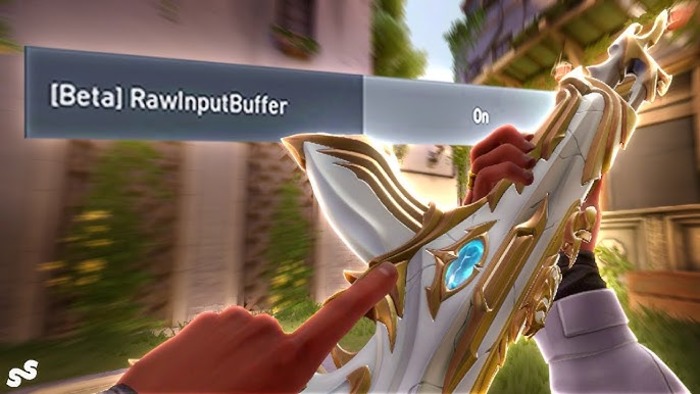
Raw Input Buffer modifies how the game processes mouse movements.
/wp:paragraph
wp:paragraph
Instead of relying on Windows to interpret and adjust your mouse input, the game receives the data directly from your mouse hardware.
/wp:paragraph
wp:paragraph
Cutting out the middleman (Windows) prevents unnecessary alterations or delays. The result? Smooth, consistent, and accurate mouse control.
/wp:paragraph
wp:paragraph
Key aspects of Raw Input Buffer include:
/wp:paragraph
wp:list
- wp:list-item
- Disabling Windows mouse acceleration and processing
/wp:list-item
/wp:list
wp:paragraph
/wp:paragraph
wp:list
- wp:list-item
- Reducing input lag
/wp:list-item
/wp:list
wp:paragraph
/wp:paragraph
wp:list
- wp:list-item
- Maintaining consistent mouse sensitivity across varying frame rates
/wp:list-item
/wp:list
wp:paragraph
/wp:paragraph
wp:list
- wp:list-item
- Achieving a 1:1 correlation between physical mouse movement and in-game action
/wp:list-item
/wp:list
wp:image {“id”:25287,”width”:”660px”,”height”:”auto”,”sizeSlug”:”full”,”linkDestination”:”none”,”align”:”center”}
/wp:image
wp:heading
Why Activate the Direct Mouse Input Buffer?
/wp:heading
wp:paragraph
The Direct Mouse Input Buffer has become increasingly popular among Valorant players, particularly in competitive play, due to several key advantages:
/wp:paragraph
wp:list
- wp:list-item
- Reduced Input Delay: Processing mouse movements more directly minimizes the time between physical movement and the action on the screen.
/wp:list-item
/wp:list
wp:paragraph
/wp:paragraph
wp:list
- wp:list-item
- Consistency Across Systems: It guarantees a more consistent experience across various computers, remaining less affected by system settings like those in the operating system.
/wp:list-item
/wp:list
wp:paragraph
/wp:paragraph
wp:list
- wp:list-item
- Increased Accuracy: For players who disable their operating system’s built-in mouse acceleration feature, the direct input method offers finer control and more precise aiming.
/wp:list-item
/wp:list
wp:paragraph
/wp:paragraph
wp:list
- wp:list-item
- Sensitivity Stability: The direct input method helps maintain consistent sensitivity levels, even when frame rates vary.
/wp:list-item
/wp:list
wp:paragraph
/wp:paragraph
wp:list
- wp:list-item
- Muscle Memory Support: With consistent input, building and retaining muscle memory for accurate aiming becomes easier.
/wp:list-item
/wp:list
wp:paragraph
/wp:paragraph
wp:list
- wp:list-item
- Psychological Benefit: Even if the technical improvements are minimal, many players feel more in control, which can boost their confidence during gameplay.
/wp:list-item
/wp:list
wp:paragraph
/wp:paragraph
wp:list
- wp:list-item
- Adoption by Professionals: Many professional players prefer using direct input, increasing its use within the community.
/wp:list-item
/wp:list
wp:paragraph
/wp:paragraph
wp:list
- wp:list-item
- Improved Compatibility: This method helps resolve specific mouse drivers or software issues.
/wp:list-item
/wp:list
wp:heading
How to Enable Direct Mouse Input Buffer
/wp:heading
wp:paragraph
Activating the Direct Mouse Input Buffer in Valorant is simple:
/wp:paragraph
wp:list {“ordered”:true}
- wp:list-item
- Launch the game and enter the main menu.
- Click the settings icon in the top right corner.
- Navigate to the “General” section in the settings.
- Scroll down and locate the “Direct Mouse Input Buffer” option.
- Switch the toggle to enable the feature.
- (Optional but recommended) Restart the game to ensure the settings take full effect.
- Test the changes by playing in the Range or a Deathmatch mode.
/wp:list-item
wp:list-item
/wp:list-item
wp:list-item
/wp:list-item
wp:list-item
/wp:list-item
wp:list-item
/wp:list-item
wp:list-item
/wp:list-item
wp:list-item
/wp:list-item
/wp:list
wp:paragraph
Tip:
/wp:paragraph
wp:paragraph
After enabling the Direct Mouse Input Buffer, you may want to adjust your sensitivity slightly, as the more immediate input might initially feel different.
/wp:paragraph
wp:heading
Related Concepts
/wp:heading
wp:image {“id”:25285,”width”:”682px”,”height”:”auto”,”sizeSlug”:”full”,”linkDestination”:”none”,”align”:”center”}


/wp:image
wp:paragraph
When you dive into adjusting the Raw Input Buffer and mouse settings in Valorant, you may come across these key concepts:
/wp:paragraph
wp:list
- wp:list-item
- Input Delay: The time it takes for your action to appear on screen after performing it.
/wp:list-item
/wp:list
wp:paragraph
/wp:paragraph
wp:list
- wp:list-item
- Mouse Sensitivity: A measure of your mouse’s sensitivity at the hardware level, showing the cursor’s movement for each inch the mouse moves.
/wp:list-item
/wp:list
wp:paragraph
/wp:paragraph
wp:list
- wp:list-item
- Adequate Sensitivity: Your mouse sensitivity and in-game settings combine to reflect the overall responsiveness of your mouse movements.
/wp:list-item
/wp:list
wp:paragraph
/wp:paragraph
wp:list
- wp:list-item
- Reporting Frequency: The rate at which your mouse sends updates about its position to your computer, typically measured in Hertz (Hz).
/wp:list-item
/wp:list
wp:paragraph
/wp:paragraph
wp:list
- wp:list-item
- Speed Variation: A setting that alters the cursor’s movement speed depending on how quickly you move the mouse.
/wp:list-item
/wp:list
wp:paragraph
/wp:paragraph
wp:list
- wp:list-item
- Direct Movement: When your mouse movement matches the in-game movement without any adjustments.
/wp:list-item
/wp:list
wp:paragraph
Now you have a clearer understanding of the Raw Input Buffer in Valorant. Although this feature can improve your precision, it’s not a quick fix for perfect shots.
/wp:paragraph
wp:paragraph
The optimal settings are the ones that feel right for you. Try Raw Input Buffer, practice with it, and see if it boosts your performance.
/wp:paragraph
wp:paragraph
This tweak turns good rounds into great ones and your near-misses into game-winning moments.
/wp:paragraph
wp:paragraph
Now, jump into the action, and may your aim be as sharp as your focus in a high-stakes 1v5!
/wp:paragraph

