

wp:paragraph
When individuals buy online, they can’t feel or test a product. They use what they can see. That is the reason visuals play an important role. A simple, well-produced product video can assist individuals in viewing how something functions, what it is, and why they should purchase it.
/wp:paragraph
wp:paragraph
Most online shops today use videos to display their products. Videos capture people’s attention more than pictures. Videos inform buyers what they’re purchasing. And they tend to drive more sales.
/wp:paragraph
wp:paragraph
You don’t have to be a professional or break the bank to produce these videos. You simply need the right equipment. That is where the CapCut desktop video editor enters the scene.
/wp:paragraph
wp:paragraph
This blog will teach you how to use CapCut PC to make your own product videos. You’ll discover what it has to offer, why it assists, and how to begin using it for your shop today.
/wp:paragraph
wp:heading
CapCut Desktop Video Editor for Product Video Creation
/wp:heading
wp:paragraph
CapCut PC assists you in creating tidy and sharp videos for your store. It includes features such as trim, split, text, transitions, and music sync. These features allow you to feature your product in a concise and seamless manner.
/wp:paragraph
wp:paragraph
You are free to download the editor for free. However, to use some extra features, you may need to pay. That includes advanced tools like tracking, effects, and more.
/wp:paragraph
wp:paragraph
CapCut Desktop Video Editor also gives you smart features powered by AI. You can use auto-cutting to speed up your work or let the tool handle small edits. There’s even a bold text-to-speech feature if you don’t want to record your voice.
/wp:paragraph
wp:paragraph
The layout is simple, and the controls are easy to use. Whether it’s your first time editing or you’ve done it before, you can make great videos fast. That’s what makes CapCut PC a good choice for product videos.
/wp:paragraph
wp:heading
Key Benefits of Using CapCut PC for Product Videos
/wp:heading
wp:heading {“level”:3}
1. Showcase Product Details Clearly
/wp:heading
wp:paragraph
CapCut Desktop video editor lets you zoom in, add cuts, or use slow motion to show your product up close. These tools help shoppers see the texture, shape, and how your product works in real life.
/wp:paragraph
wp:heading {“level”:3}
2. Add Branding Easily
/wp:heading
wp:paragraph
You can drop in your logo or create intro and outro clips. This helps people know it’s your brand no matter where they see the video, on YouTube, TikTok, or Instagram.
/wp:paragraph
wp:heading {“level”:3}
3. Include Customer Testimonials or Reviews
/wp:heading
wp:paragraph
You can add reviews by placing text on the screen or using voice clips from real customers. CapCut Desktop video editor supports layers, so you can play video, voice, and background music at the same time.
/wp:paragraph
wp:paragraph
The bold AI video generator also helps you create short review scenes that grab attention.
/wp:paragraph
wp:heading {“level”:3}
4. Save Time with AI Tools
/wp:heading
wp:paragraph
CapCut PC helps speed up your editing with smart features like auto-captions and smart trims. These tools save you time by handling small tasks automatically.
/wp:paragraph
wp:paragraph
This means you can focus on bigger edits while the tool takes care of the details. Perfect for busy business owners, it keeps your workflow moving smoothly, saving you hours of manual editing.
/wp:paragraph
wp:heading {“level”:3}
5. High-Quality Output for All Platforms
/wp:heading
wp:paragraph
CapCut ensures your videos look great no matter where you share them. It offers settings optimized for every platform, from Instagram to YouTube.
/wp:paragraph
wp:paragraph
Whether it’s a small phone screen or a large monitor, your video will stay crisp and clear. This makes sure your customers always get the best viewing experience on any device.
/wp:paragraph
wp:heading
Steps to Create Product Videos Using CapCut Desktop
/wp:heading
wp:heading {“level”:3}
Step 1: Download and Install CapCut Desktop
/wp:heading
wp:paragraph
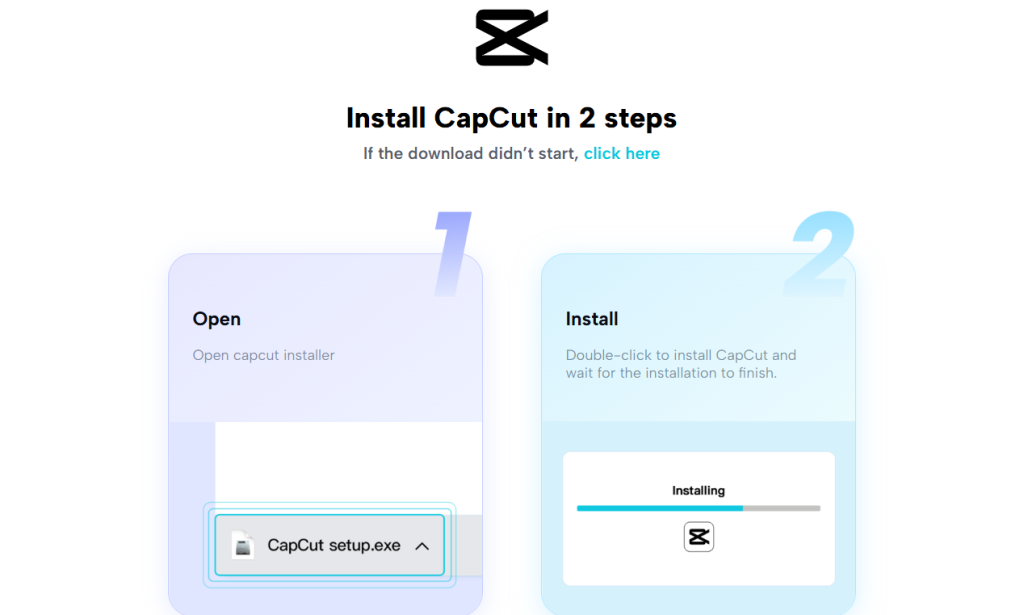
To get started, visit the official CapCut website and download the CapCut PC version.
/wp:paragraph
wp:paragraph
The download is free, and the setup is easy. Keep in mind, though, that some tools may only be available with a paid plan.
/wp:paragraph
wp:paragraph
After installation, sign up or log in. This gives you full access to the editing tools.
/wp:paragraph
wp:image {“id”:10576,”align”:”center”}
/wp:image
wp:heading {“level”:3}
Step 2: Import Your Product Footage
/wp:heading
wp:paragraph
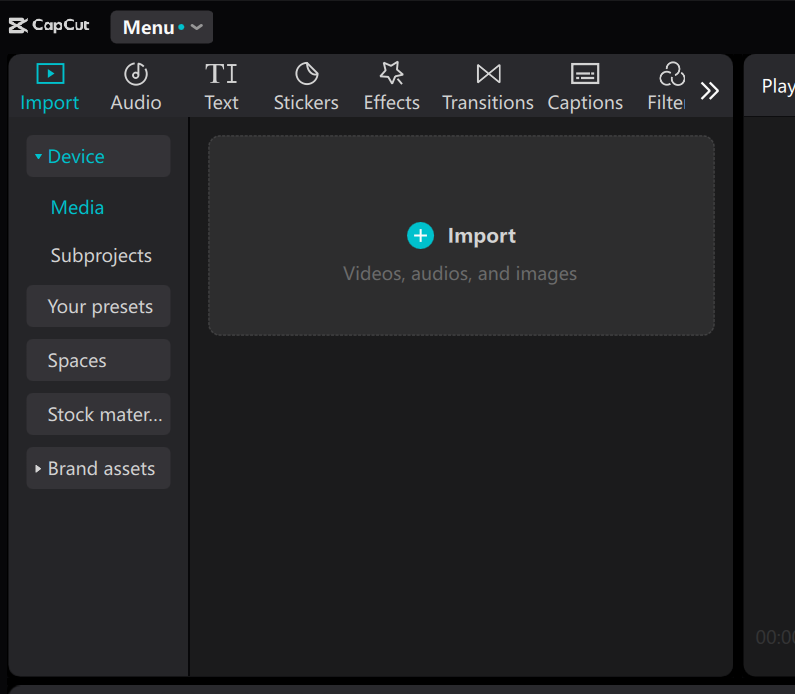
Open the editor and click “Import” to upload your product clips.
/wp:paragraph
wp:paragraph
You can keep your files in folders or drag them straight onto the timeline. This helps you stay organized from the start.
/wp:paragraph
wp:image {“id”:10572,”align”:”center”}
/wp:image
wp:heading {“level”:3}
Step 3: Edit Your Video
/wp:heading
wp:paragraph
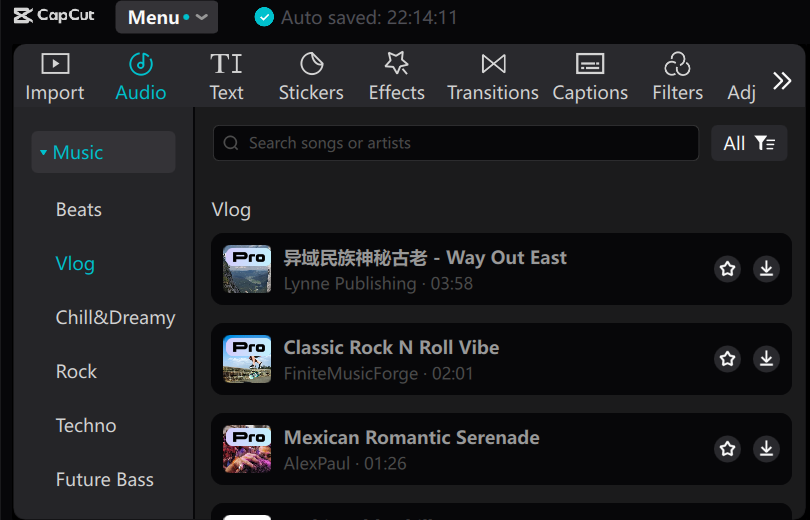
Trim long clips, split scenes, or use transitions and filters to give your video a smooth look.
/wp:paragraph
wp:paragraph
Add text to call out important features, prices, or deals.
/wp:paragraph
wp:paragraph
You can also bring in music or use the bold voice changer tool to create voice-overs that match your brand.
/wp:paragraph
wp:image {“id”:10579,”align”:”center”}
/wp:image
wp:paragraph
If you’re in a rush, try auto-cutting or auto-captions to speed up the process.
/wp:paragraph
wp:heading {“level”:3}
Step 4: Export and Share
/wp:heading
wp:paragraph
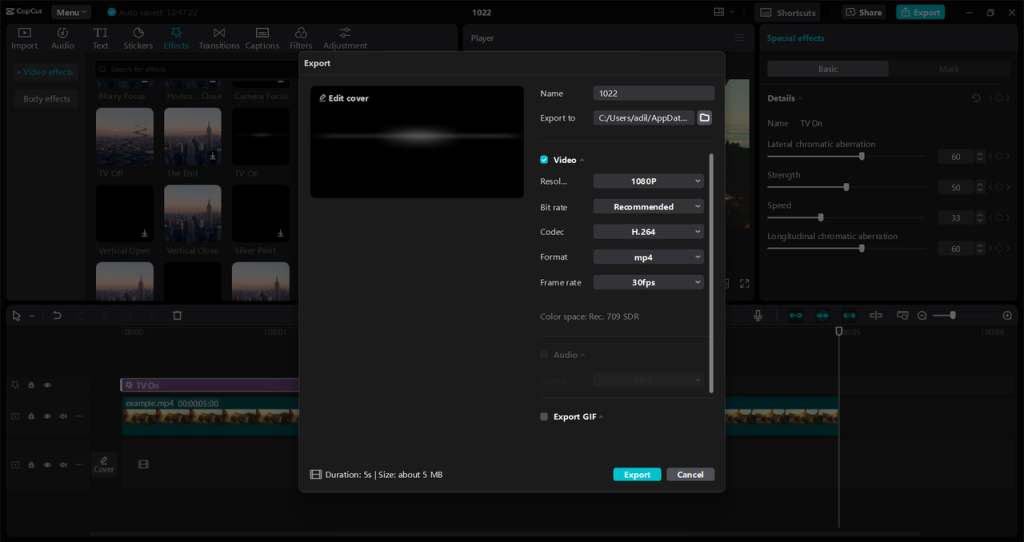
Pick the right format, resolution, and screen size for your store or social media page. You can save the video to your device or share it directly online.
/wp:paragraph
wp:image {“id”:10574,”align”:”center”}
/wp:image
wp:heading
Conclusion
/wp:heading
wp:paragraph
Product videos help people see what you offer and feel confident about buying. A clear and well-edited video can turn a simple visit into a sale.
/wp:paragraph
wp:paragraph
CapCut PC makes this process smooth. You get strong tools to create clean and sharp videos that show off your product the right way.
/wp:paragraph
wp:paragraph
Most tools are free to use, and if you want more advanced options are available too.
/wp:paragraph
wp:paragraph
If you want to grow your store and show your products better, start with CapCut Desktop. One good video can make a big difference in how your customers choose.
/wp:paragraph
