

wp:paragraph
Network buffering in Valorant plays a vital role in managing data transfer between the game client and server, helping to smooth out any inconsistencies caused by network fluctuations for a more stable gameplay experience.
/wp:paragraph
wp:paragraph
Attention, Valorant players and network enthusiasts! Today, we’re diving into a crucial feature directly impacting your online gameplay: network buffering.
/wp:paragraph
wp:paragraph
If you’ve ever wondered why your shots don’t always land as intended or why your movement feels off, network buffering could be the reason – or the solution!
/wp:paragraph
wp:paragraph
Let’s explore this important yet often overlooked aspect of online gaming.
/wp:paragraph
wp:image {“id”:25420,”width”:”646px”,”height”:”auto”,”sizeSlug”:”full”,”linkDestination”:”none”,”align”:”center”}

/wp:image
wp:heading
How Network Buffering Affects Valorant
/wp:heading
wp:paragraph
In Valorant, network buffering ensures smooth gameplay by regulating the data flow between your device and the game’s servers, even when your internet connection faces interruptions.
/wp:paragraph
wp:paragraph
Here’s the process:
/wp:paragraph
wp:list
- wp:list-item
- The game continuously exchanges data packets with the server.
/wp:list-item
/wp:list
wp:paragraph
/wp:paragraph
wp:list
- wp:list-item
- Network buffering temporarily stores these packets.
/wp:list-item
/wp:list
wp:paragraph
/wp:paragraph
wp:list
- wp:list-item
- When some packets arrive late or in the wrong order, the buffer holds the correctly timed packets.
/wp:list-item
/wp:list
wp:paragraph
/wp:paragraph
wp:list
- wp:list-item
- The game reorders and synchronizes the data before presenting it to you.
/wp:list-item
/wp:list
wp:paragraph
The result? A more stable and consistent gaming experience, even when your internet fluctuates.
/wp:paragraph
wp:heading
How Network Buffering Affects Your Gameplay
/wp:heading
wp:paragraph
Network buffering plays a crucial role in shaping your Valorant experience, with both positive and negative outcomes:
/wp:paragraph
wp:paragraph
Benefits:
/wp:paragraph
wp:list
- wp:list-item
- Improved Movement Fluidity: It minimizes interruptions and ensures smoother motion from other players.
/wp:list-item
/wp:list
wp:paragraph
/wp:paragraph
wp:list
- wp:list-item
- Enhanced Stability: It helps maintain a steady game state even when there are minor disruptions in your internet connection.
/wp:list-item
/wp:list
wp:paragraph
/wp:paragraph
wp:list
- wp:list-item
- Equal Opportunity: It works to ensure fairness for players with different internet speeds and connection quality.
/wp:list-item
/wp:list
wp:paragraph
Drawbacks:
/wp:paragraph
wp:list
- wp:list-item
- Delayed Response: It may cause a slight delay between your action and what appears on screen.
/wp:list-item
/wp:list
wp:paragraph
/wp:paragraph
wp:list
- wp:list-item
- Mismatch Between Display and Reality: What you see on your display may not always match the server’s actual state.
/wp:list-item
/wp:list
wp:paragraph
/wp:paragraph
wp:list
- wp:list-item
- Unpredictable Shot Outcomes: You might feel like you’ve avoided an attack, but it could still register as a hit.
/wp:list-item
/wp:list
wp:paragraph
Note:
/wp:paragraph
wp:paragraph
Finding the right level of buffering is key. Too little can result in jerky gameplay, while too much can make the game slow and unresponsive.
/wp:paragraph
wp:image {“id”:25419,”width”:”672px”,”height”:”auto”,”sizeSlug”:”full”,”linkDestination”:”none”,”align”:”center”}
/wp:image
wp:heading
Improving Network Buffering for Enhanced Gameplay
/wp:heading
wp:paragraph
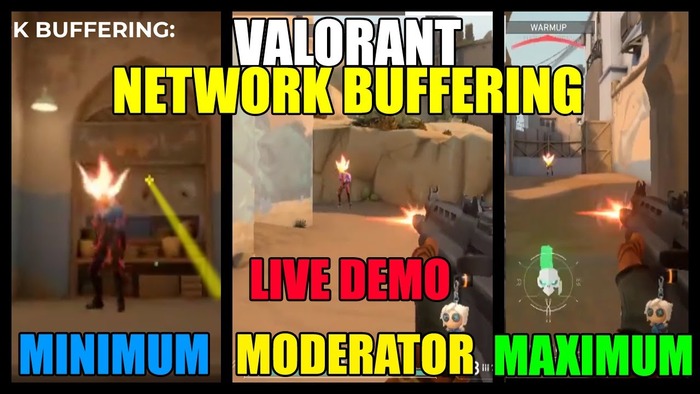
Valorant allows you to adjust network buffering settings to optimize your gaming experience. Here’s a breakdown of the available options:
/wp:paragraph
wp:list
- wp:list-item
- Minimum Buffer: The lowest level of delay introduced.
wp:list- wp:list-item
- Lower values: Increase responsiveness, but may reduce connection stability.
- Higher values: Enhance stability, though they might reduce how quickly the game reacts.
/wp:list-item
wp:list-item/wp:list-item
/wp:list
/wp:list-item
/wp:list
wp:paragraph
/wp:paragraph
wp:list
- wp:list-item
- Maximum Buffer: Systems allow only a limited amount of delay. wp:list
- wp:list-item
- Lower values: Limit the maximum delay, but can cause more noticeable connection problems.
- Higher values: Smooth out gameplay, but may add additional delay.
/wp:list-item
wp:list-item/wp:list-item
/wp:list
/wp:list-item
/wp:list
wp:paragraph
Buffering Mode Options:
/wp:paragraph
wp:list
- wp:list-item
- Off: No extra delay added. Provides maximum responsiveness but may lead to instability.
/wp:list-item
/wp:list
wp:paragraph
/wp:paragraph
wp:list
- wp:list-item
- Low: Adds a slight delay, offering a balance between responsiveness and stability.
/wp:list-item
/wp:list
wp:paragraph
/wp:paragraph
wp:list
- wp:list-item
- Medium: The default setting is ideal for most types of connections.
/wp:list-item
/wp:list
wp:paragraph
/wp:paragraph
wp:list
- wp:list-item
- High: Provides maximum smoothing for unstable connections, though it might increase delay.
/wp:list-item
/wp:list
wp:paragraph
How to Adjust These Settings:
/wp:paragraph
wp:list {“ordered”:true}
- wp:list-item
- Launch Valorant and open the Settings menu.
- Go to the ‘General’ section.
- Scroll down to the ‘Network Buffering’ area.
- Experiment with different settings to find the best option for your setup.
/wp:list-item
wp:list-item
/wp:list-item
wp:list-item
/wp:list-item
wp:list-item
/wp:list-item
/wp:list
wp:paragraph
Tip:
/wp:paragraph
wp:paragraph
Test your chosen settings in the Practice Range or Deathmatch mode before engaging in competitive matches to see how they affect your gameplay.
/wp:paragraph
wp:heading {“level”:3}
Other Related Concepts
/wp:heading
wp:paragraph
When you experience connection delays in the game, you might come across these related terms:
/wp:paragraph
wp:list
- wp:list-item
- Response Time: Describes the time it takes for your device to send data to the system and get a reply.
/wp:list-item
/wp:list
wp:paragraph
/wp:paragraph
wp:list
- wp:list-item
- Delay: Represents the gap between when you take action and when it appears in the game.
/wp:list-item
/wp:list
wp:paragraph
/wp:paragraph
wp:list
- wp:list-item
- Data Loss: Occurs when information fails to reach its destination, causing missing data in the game.
/wp:list-item
/wp:list
wp:paragraph
/wp:paragraph
wp:list
- wp:list-item
- Data Prediction: The method used by the game to estimate movement based on the received information.
/wp:list-item
/wp:list
wp:paragraph
/wp:paragraph
wp:list
- wp:list-item
- Update Frequency: Indicates how often the system refreshes the game’s state.
/wp:list-item
/wp:list
wp:paragraph
/wp:paragraph
wp:list
- wp:list-item
- Advantage of First Movement: Refers to the occurrence where a player moving first can detect an opponent slightly earlier than the opponent sees them.
/wp:list-item
/wp:list
wp:paragraph
/wp:paragraph
wp:list
- wp:list-item
- Mismatch: Happens when the game’s client and the server disagree on the game’s current state.
/wp:list-item
/wp:list
wp:paragraph
/wp:paragraph
wp:list
- wp:list-item
- Backtracking: Describes when objects or characters seem to return to a previous location during gameplay.
/wp:list-item
/wp:list
wp:paragraph
/wp:paragraph
wp:list
- wp:list-item
- Inconsistent Response: Refers to fluctuating connection times that affect how steady your link is.
/wp:list-item
/wp:list
wp:paragraph
/wp:paragraph
wp:list
- wp:list-item
- Pre-Event Guessing: Describes the system’s effort to predict game events before receiving confirmation.
/wp:list-item
/wp:list
wp:paragraph
/wp:paragraph
wp:list
- wp:list-item
- Communication System: Refers to the code that governs how the game exchanges data across the network.
/wp:list-item
/wp:list
wp:paragraph
/wp:paragraph
wp:list
- wp:list-item
- Impact Detection: Refers to determining whether your actions connect with the intended target.
/wp:list-item
/wp:list
wp:paragraph
Now, you know how to understand and manage connection delays in your game. Remember that the ideal settings depend on your network speed, device performance, and personal preferences.
/wp:paragraph
wp:paragraph
Feel free to test different configurations, but remember, no amount of tweaking can fully compensate for a weak connection.
/wp:paragraph
wp:paragraph
Fine-tune your setup, stay aware of your network status, and aim for smooth and consistent gameplay.
/wp:paragraph
wp:paragraph
With the proper adjustments, your performance will reach its peak!
/wp:paragraph
