

wp:paragraph
A DDoS (Distributed Denial of Service) attack attempts to disrupt a network, service, or website.
/wp:paragraph
wp:paragraph
Attackers send massive internet traffic from different sources, making it slow or unavailable for real users.
/wp:paragraph
wp:paragraph
Hello, online protectors and gaming enthusiasts! Today, let’s talk about something that troubles both gamers and developers: DDoS.
/wp:paragraph
wp:paragraph
No, it’s not an incredible new dance or a secret gaming term. A cyber attack can ruin your smooth gaming experience by causing frustrating delays.
/wp:paragraph
wp:paragraph
Let’s explain what DDoS is and why it matters in gaming.
/wp:paragraph
wp:image {“id”:24301,”width”:”672px”,”height”:”auto”,”sizeSlug”:”full”,”linkDestination”:”none”,”align”:”center”}

/wp:image
wp:heading
How DDoS Attacks Disrupt Gaming?
/wp:heading
wp:paragraph
DDoS stands for Distributed Denial of Service. It’s a cyber attack that floods a system, like a game server, with too much internet traffic.
/wp:paragraph
wp:paragraph
The purpose? To slow it down or take it offline. Imagine thousands of people trying to squeeze through a tiny door simultaneously – chaos is unavoidable!
/wp:paragraph
wp:heading
Meaning and Background of the Term
/wp:heading
wp:paragraph
Denial of Service (DoS) attacks started in the early days of the Internet. As security improved, attackers created new ways to break through defenses.
/wp:paragraph
wp:paragraph
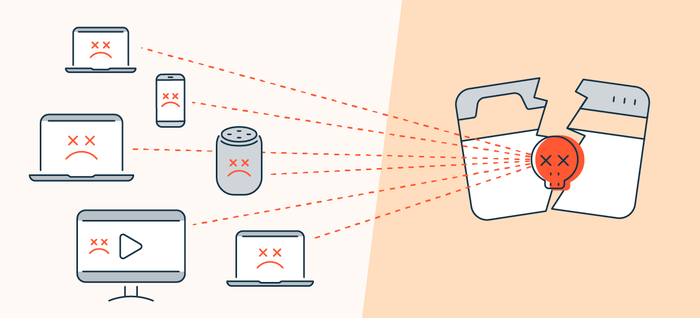
Their efforts led to Distributed Denial of Service (DDoS) attacks. Unlike DoS, DDoS uses many devices to flood a target with traffic, making defense more difficult.
/wp:paragraph
wp:image {“id”:24302,”width”:”660px”,”height”:”auto”,”sizeSlug”:”full”,”linkDestination”:”none”,”align”:”center”}
/wp:image
wp:paragraph
DDoS became widely recognized in the late 1990s and early 2000s when these attacks grew more frequent.
/wp:paragraph
wp:paragraph
DDoS attacks became a major issue in online gaming as multiplayer games gained popularity. Some players used them to interfere with matches and disrupt opponents.
/wp:paragraph
wp:heading
How DDoS Attacks Work in Gaming?
/wp:heading
wp:paragraph
DDoS attacks overwhelm gaming servers or individual players by flooding them with excessive traffic. The process works as follows:
/wp:paragraph
wp:list
- wp:list-item
- Attackers control a group of infected devices (botnet) to send high traffic to game servers.
- The sudden spike in traffic exceeds the server’s capacity, causing slow performance or complete failure.
- Players face lag, frequent disconnections, or lose access to the game.
- Some attackers directly target specific players’ IP addresses, forcing them offline in the middle of a match.
/wp:list-item
wp:list-item
/wp:list-item
wp:list-item
/wp:list-item
wp:list-item
/wp:list-item
/wp:list
wp:heading
Effects of DDoS Attacks on Gamers
/wp:heading
wp:image {“id”:24300,”width”:”674px”,”height”:”auto”,”sizeSlug”:”full”,”linkDestination”:”none”,”align”:”center”}
/wp:image
wp:paragraph
DDoS attacks create several problems that ruin gaming sessions:
/wp:paragraph
wp:list
- wp:list-item
- Severe Lag: Games slow down and fail to respond appropriately.
- Repeated Disconnections: Players get removed from matches multiple times.
- Server Failures: Games may become unavailable for extended periods.
- Lost Progress: Unfinished achievements and in-game items may disappear.
- Unfair Matches: Forced disconnections can affect competition and rankings.
- Frustration: Frequent disruptions make gaming less enjoyable.
/wp:list-item
wp:list-item
/wp:list-item
wp:list-item
/wp:list-item
wp:list-item
/wp:list-item
wp:list-item
/wp:list-item
wp:list-item
/wp:list-item
/wp:list
wp:heading
Ways to Reduce the Risk of DDoS Attacks
/wp:heading
wp:paragraph
No method guarantees complete protection, but these steps can help minimize threats:
/wp:paragraph
wp:list
- wp:list-item
- Use a VPN: Conceals the IP address, making it harder for attackers to locate the target.
- Keep Your IP Address Private: Avoid sharing it or clicking on suspicious links that might expose it.
- Create Strong Passwords: Prevents hackers from controlling devices for botnet attacks.
- Update Software Regularly: Ensures that games, security programs, and operating systems have the latest protections.
- Use a Gaming Router: Some routers include built-in security features against DDoS attacks.
- Be Cautious with Voice Chat: Certain voice applications can expose IP addresses.
- Report Suspicious Activity: Notifying the game’s support team helps them take action against attackers.
/wp:list-item
wp:list-item
/wp:list-item
wp:list-item
/wp:list-item
wp:list-item
/wp:list-item
wp:list-item
/wp:list-item
wp:list-item
/wp:list-item
wp:list-item
/wp:list-item
/wp:list
wp:heading
Standard Terms Related to DDoS Attacks
/wp:heading
wp:paragraph
DDoS attacks involve several key terms related to gaming security:
/wp:paragraph
wp:list
- wp:list-item
- Botnet: A collection of infected devices used to launch cyberattacks.
- IP Address: A device’s unique identifier that attackers often exploit.
- Ping: Measures connection speed, which rises significantly during attacks.
- Packet: Small data units sent across networks, sometimes manipulated in attacks.
- Bandwidth: The data capacity of a system, which DDoS attacks aim to overwhelm.
- Firewall: A security measure that helps block specific cyber threats.
- Blackholing: A method that diverts harmful traffic away from targeted servers.
- Traffic Scrubbing: A filtering process that removes detrimental data during an attack.
/wp:list-item
wp:list-item
/wp:list-item
wp:list-item
/wp:list-item
wp:list-item
/wp:list-item
wp:list-item
/wp:list-item
wp:list-item
/wp:list-item
wp:list-item
/wp:list-item
wp:list-item
/wp:list-item
/wp:list
wp:paragraph
DDoS attacks continue to cause problems in online gaming. Taking precautions helps maintain smooth gameplay and reduces disruptions.
/wp:paragraph
wp:paragraph
Keeping IP addresses secure and using proper security tools makes it harder for attackers to succeed.
/wp:paragraph
